Wedding venue catering application
Product Designer
Design a collaborative platform for clients to book the menu for an event to save time and energy
UI/UX,Brand
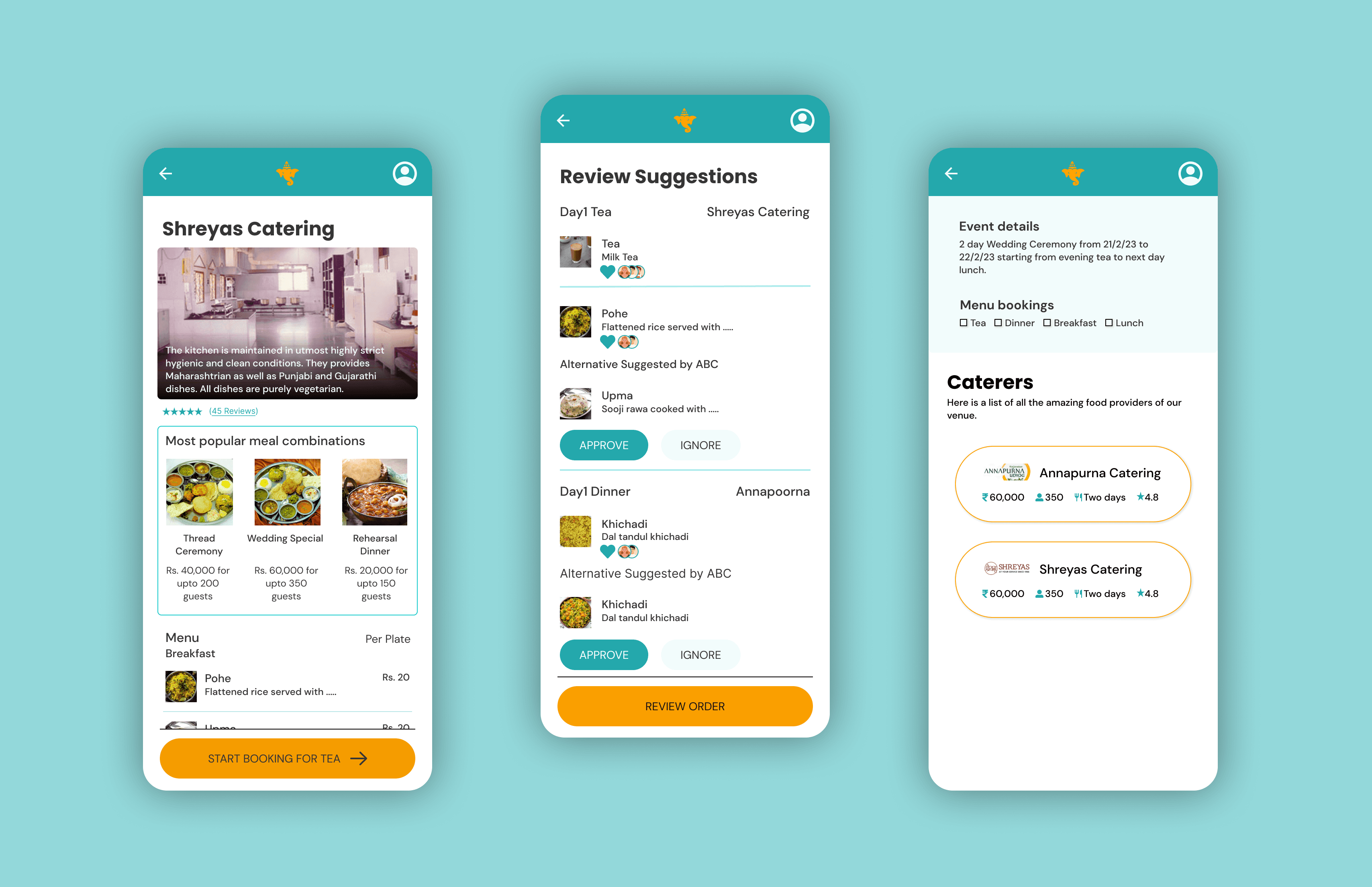
This is a personal project completed during the Google UX Design certification course by Coursera.
The Problem
Using a prompt provided by Sharpen, the case study is done on creating a mobile application for the catering services provided by Shruti Mangal Karyalay (A wedding venue in Pune, India)
The process of booking the menu for a wedding or any family function is very manual and decentralized. This causes loss of information or miscommunication even. It requires the customer to visit the venue in person a few times amidst the planning of the event.
The Goal
The goal of the project is to create a platform where the users can book the menu for their functions at a wedding venue that can be easily tracked by both the customer and the caterer.
This will smoothen the communication between the two parties amidst the hassle of organizing an event.
The Process
Understanding the user
Starting the design
Refining the design
Moving forward
Understanding the user
Summary
I conducted interviews and empathy maps to understand the users that I am designing for and their needs. The primary group of people that I interviewed were people who were in charge of deciding and booking the menu for their own, or someone else’s wedding or any similar family function. This group included people from varied age groups.
The users confirmed the initial assumption that the process of booking the menu for any event is not a smooth ride which takes up a lot of time and many visits to the vendor’s office or the wedding venues. Other problem faced by the users was finding the time to collaborate on the finalization of the menu as the decision is always made as a group and not done by one person alone.
Pain Points
 |  |  |
|---|---|---|
Multiple visits to the venue | Collaboration | Iterations |
The user has to visit the venue multiple times and exactly 8 days before the event to confirm the menu. The venue takes it down in writing and it is signed by the user and the vendor. | It takes a lot of time for the user to gather the concerned family members at one place and one time to discuss the menu and finalise it. | The menu is decided one month before the event but it needs to be conveyed only 8 days prior to the event. During this time, due to multiple reasons, the menu keeps changing internally and is hard to keep a track of it. |
Persona : Shekhar Punde
Problem Statement - Shekhar Punde is a retired family man who needs a hassle free way to arrange family functions with memorable food because he spends a lot of time in visiting the venue and booking the menu for family functions.
 | Goals
| Frustrations
|
|---|---|---|
Shekhar Punde Age : 55 Education : Electrical Engineer Hometown : Pune, India Family : Wife, two daughters Occupation : Retired business owner | Shekhar ran a stationary and printing shop and is now happily retired and enjoys spending time with his family. He has two grandsons and he loves to engage them in creative activities. He believes in celebrating every little thing with his family and is a big time foodie. He is often in charge of deciding the menus for all the celebrations that he plans. | |
Persona : Ananya Joshi
Problem Statement - Ananya Joshi is a busy corporate woman who needs a collaborative platform for discussing and booking menu for family/corporate events because she wastes a lot of time in meetings for discussion of menus for family/corporate events
 | Goals
| Frustrations
|
|---|---|---|
Ananya Joshi Age : 28 Education : MBA Hometown : Dombivli, India Family : Husband Occupation : Project Manager | Ananya is a highly ambitious woman who recently got married. She is detail oriented and depends a lot on technology to get things done in her day to day life. With her busy schedule she manages to keep in touch with her big family and is very close to her cousins. With having a big family comes planning and attending a lot of family functions, that Ananya loves to plan. | |
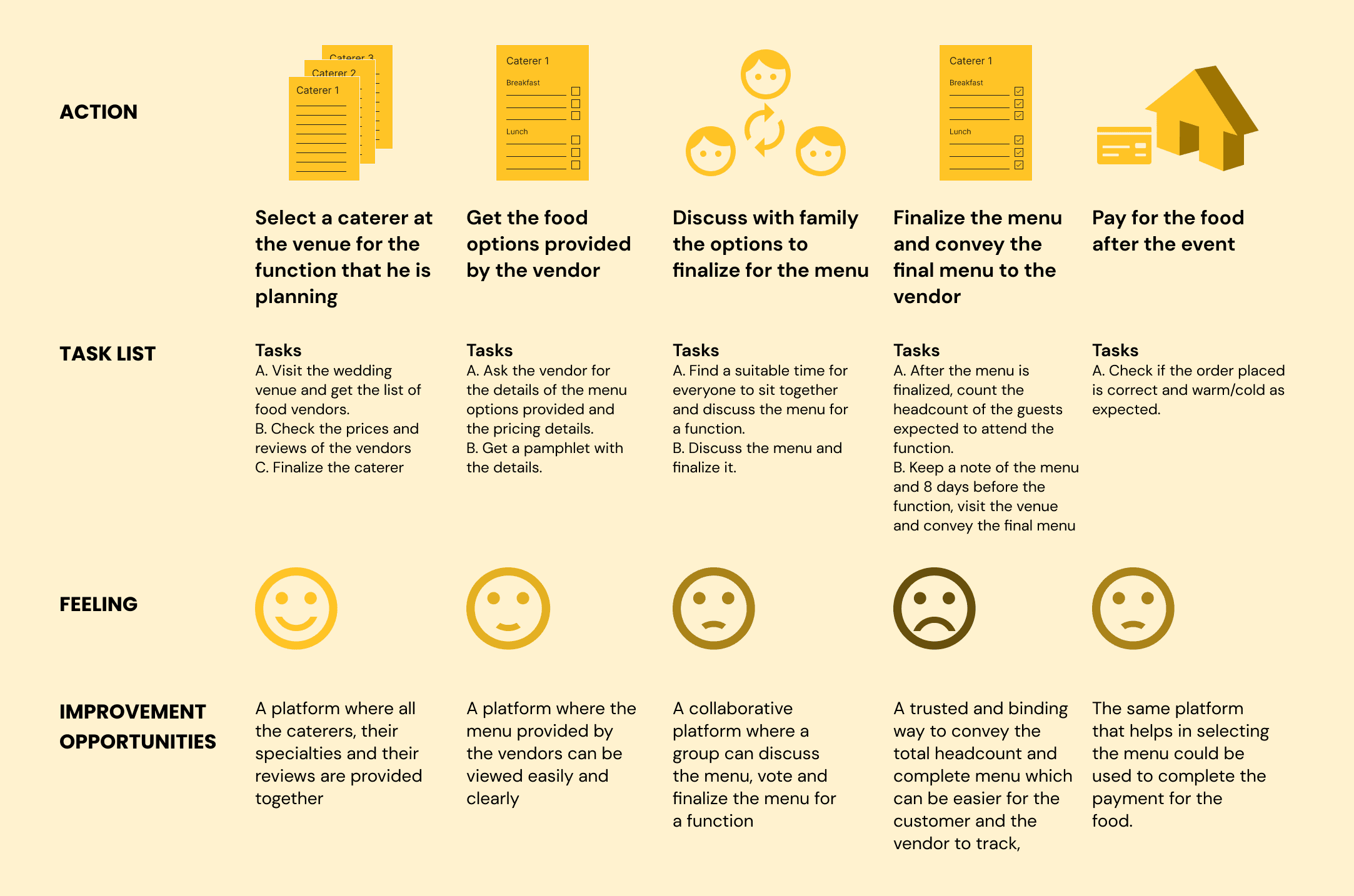
User Journey Map
Goal: Hassle free organization of memorable food for all the family functions
Starting the design
Paper wireframes
Taking the time to draft iterations of each screen of the app on paper ensured that the elements that made it to digital wireframes would be well-suited to address user pain points. For the home screen, I prioritized a quick and easy ordering process to help users save time.
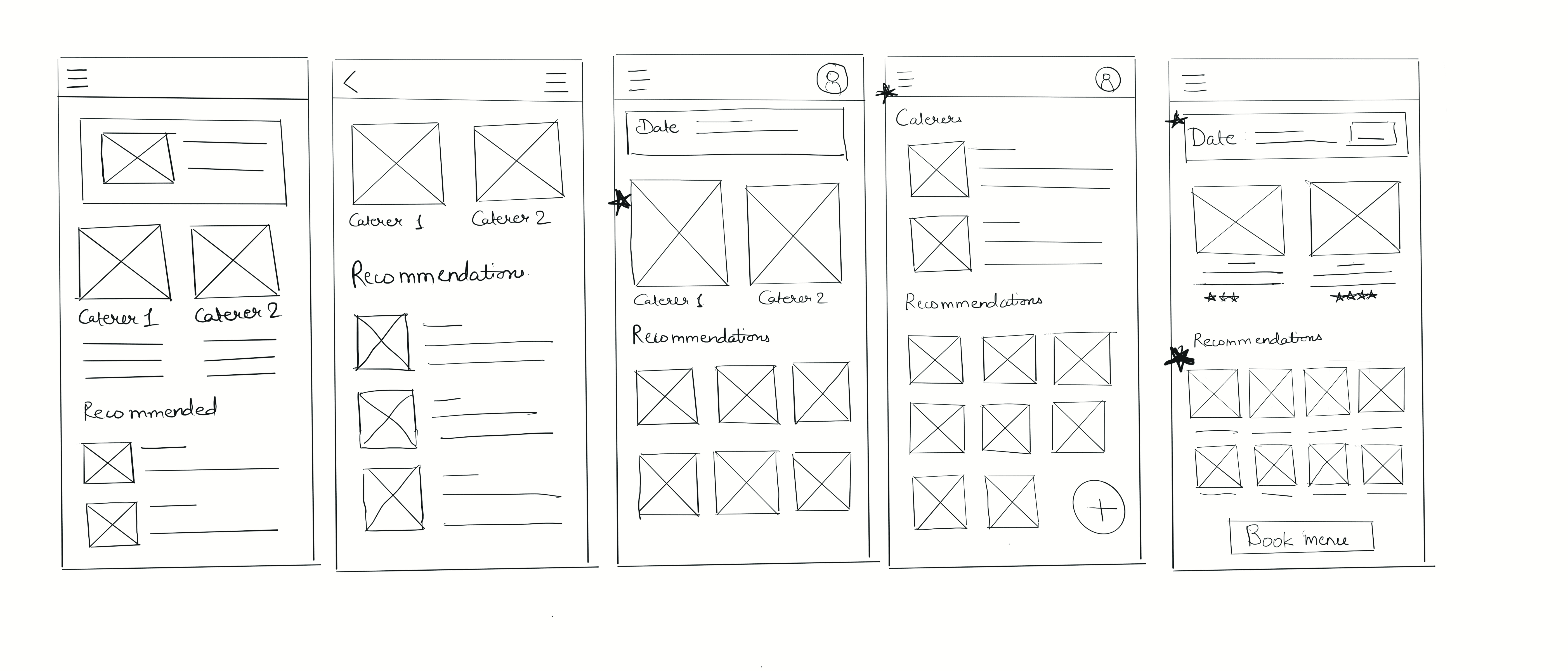
Stars were used to mark the elements of each sketch that would be used in the initial digital wireframes.
Digital wireframes
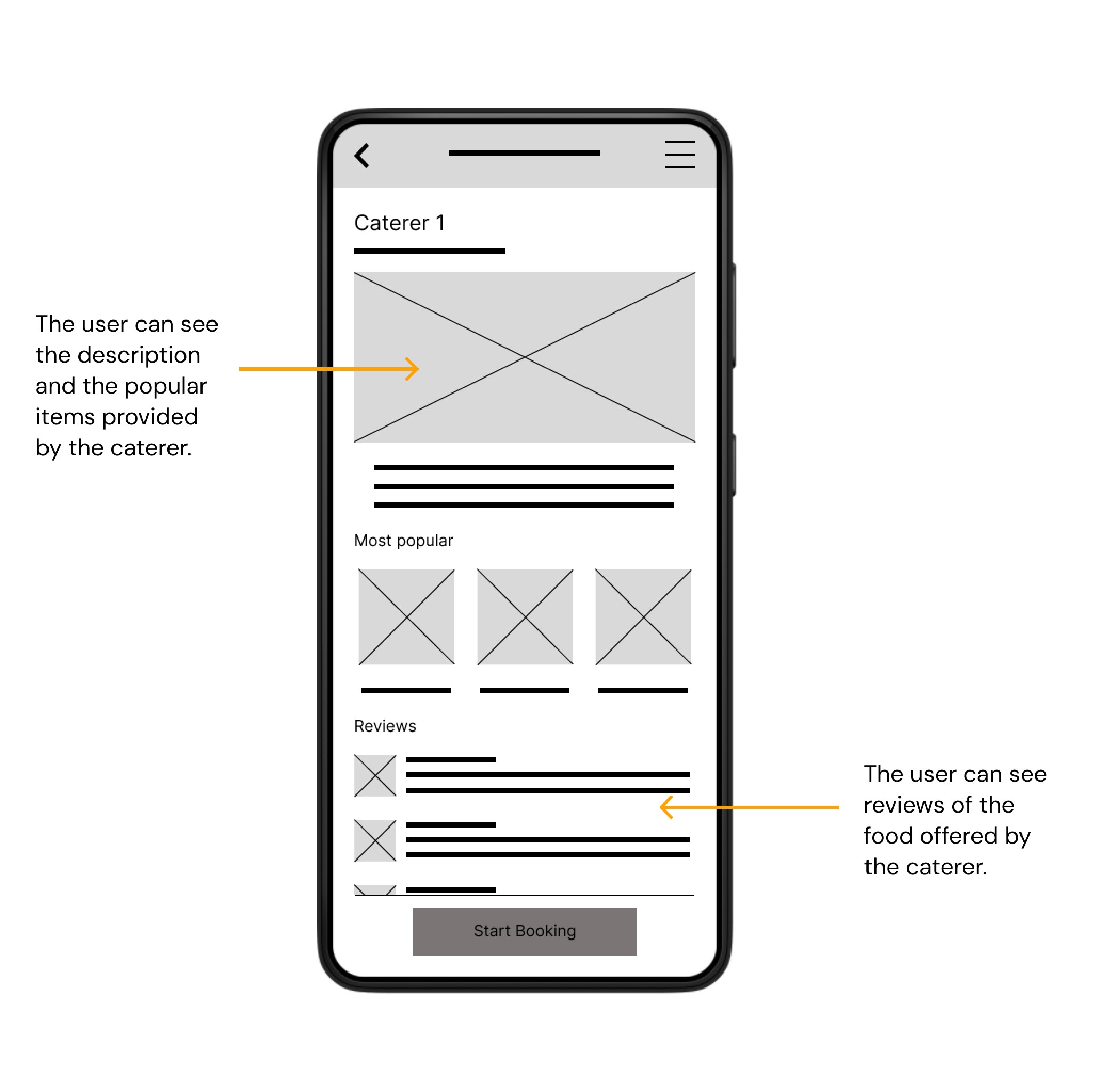
As the initial design phase continued, I made sure to base screen designs on feedback and findings from the user research.
Low Fidelity prototype
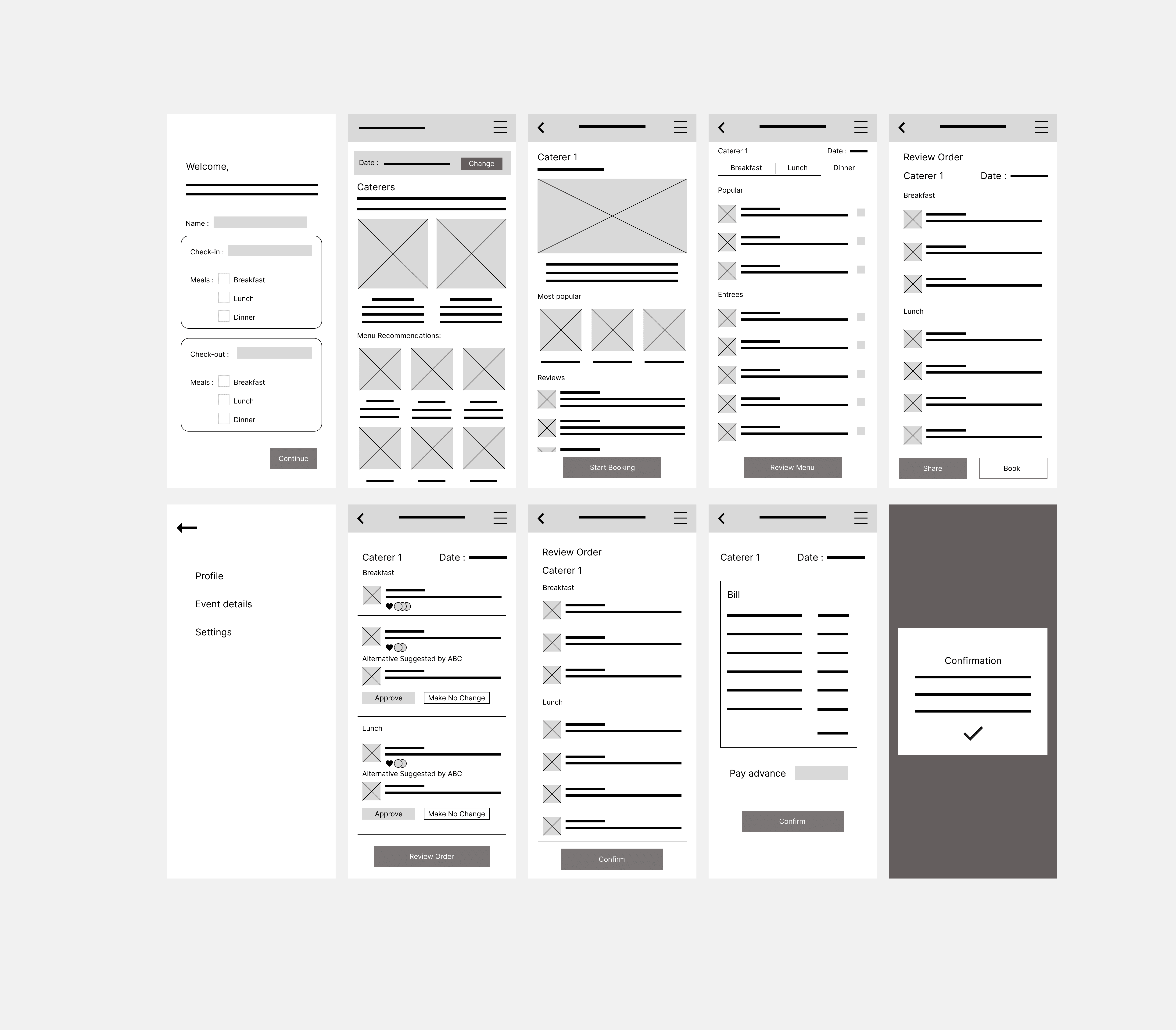
The low-fidelity prototype connected the primary user flow of building and ordering a pizza, so the prototype could be used in a usability study with users.
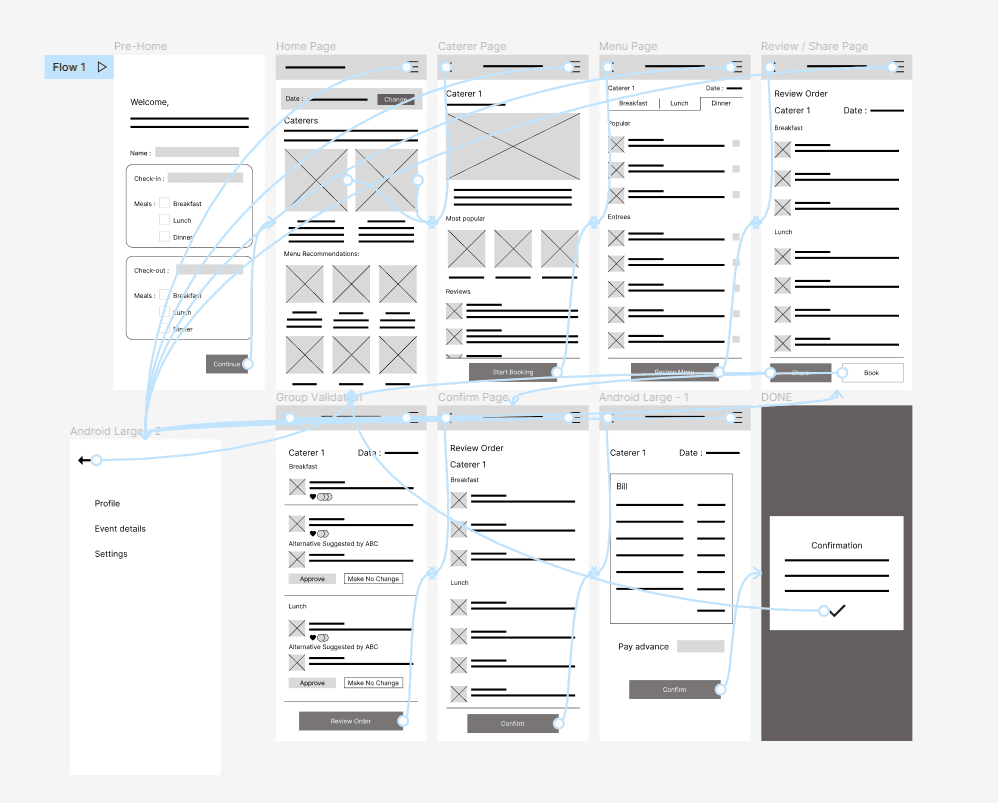
View the Shruti Mangal Karyalay app
Usability study: findings
After the low fidelity prototype was ready based on the workflow, I conducted moderated usability tests with 5 participants. These participants varied from 23 years of age to 55 years of age. They were from two different towns. I did not consider participants from different areas because the target audience of this application is from my hometown and nearby hometowns. These tests were conducted online with the following goal in mind -
Goal : Figure out if collaborative ordering in the app actually saves people time and efforts when placing group orders.
Affinity Map
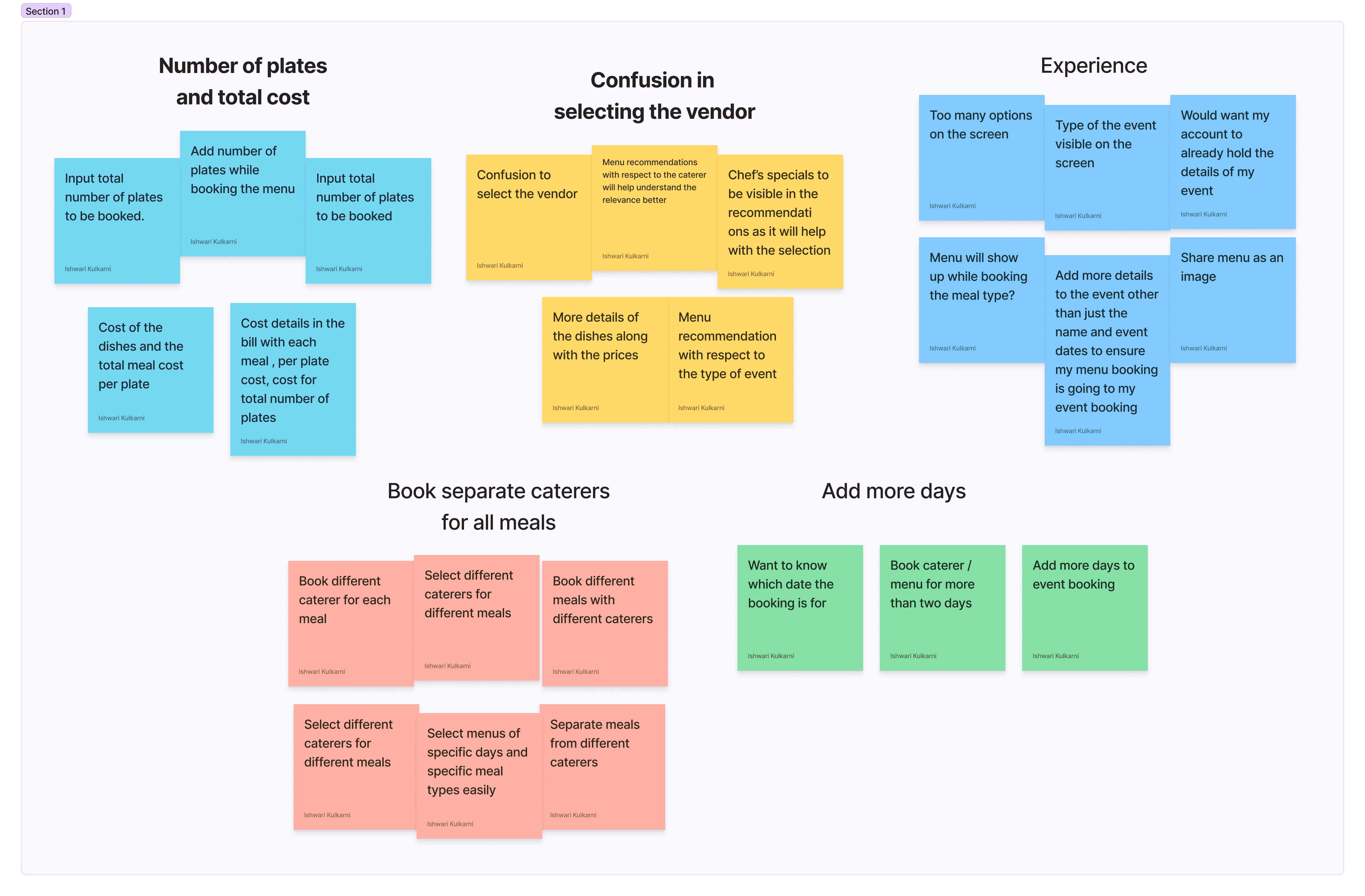
Findings
1 | 2 | 3 |
|---|---|---|
Users want to book different caterers for different meals | Users want clarity on how much each meal will cost them per plate and altogether | Users want to add more days to the event and book meals with respect to them. |
Refining the design
Mockups
After the usability test, I revised the mockups according to the themes that came up while the activity of affinity mapping. The themes and the revisions are as described below in details.
People want to book different caterers for different meals | Before | After |
|---|---|---|
Supporting evidence from the usability study.
“I want to know how I can book separate meals from different caterers. I also want to know which dates I am booking the menu for.” -Mandar Kulkarni, event planner from Mumbai | 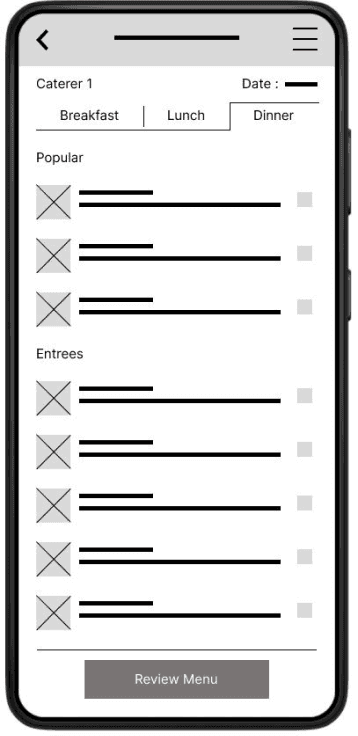 | 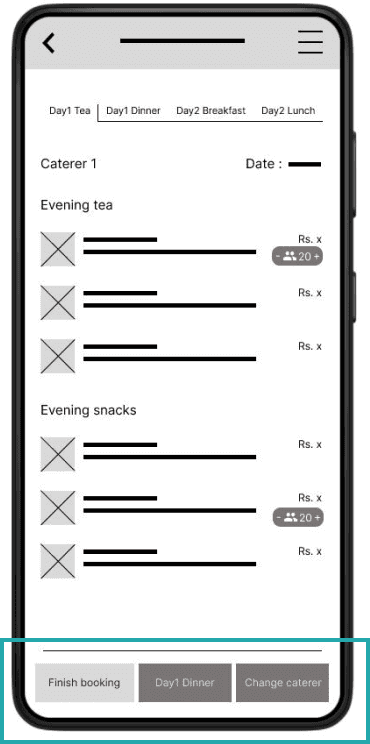 |
Add more than two days to the event | Before | After |
|---|---|---|
Supporting evidence from the usability study.
"Is there a way that I can add another day to the event?” Sarvesh Kale, Pune (P0) | 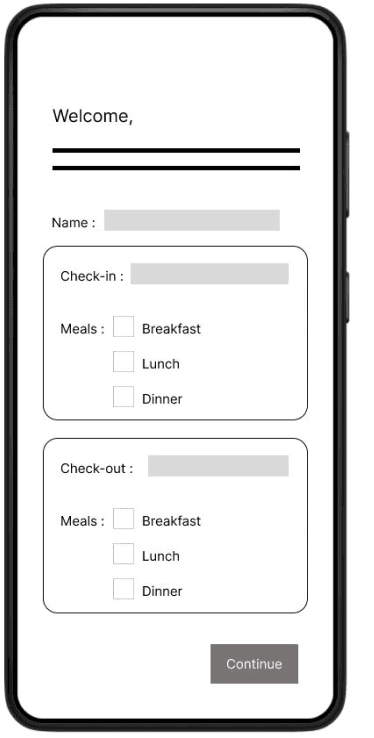 | 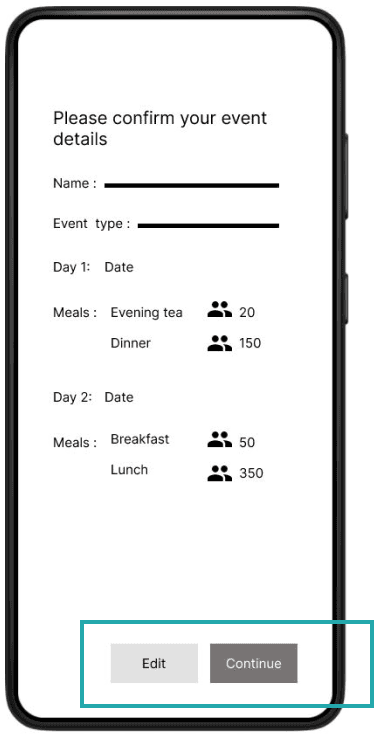 |
Enter the number of guests and see the cost accordingly | Before | After |
|---|---|---|
It was observed that 4 out of 5 participants found it difficult to see how much the meal they selected would cost for all the guests.
"I wish I could see the cost of all the dishes individually and also after I customize the whole meal. I would like to know how much it would cost me per plate.” -Rohini Kale, Pune(P0) | 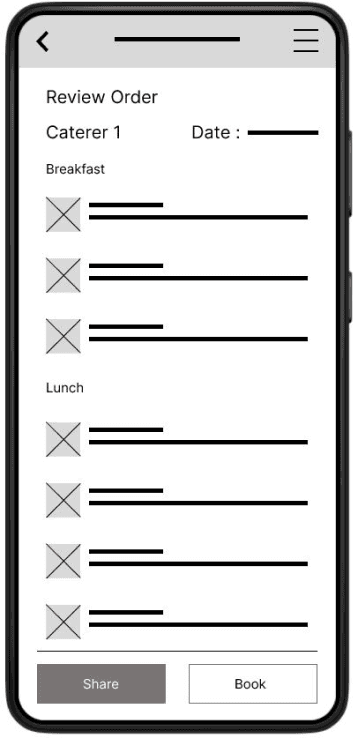 | 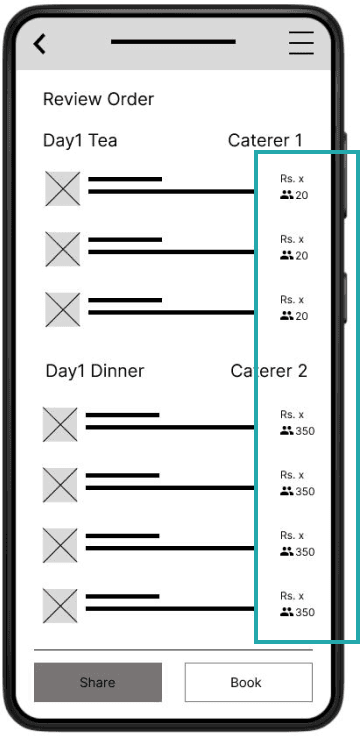 |
Low Fidelity Prototype
High Fidelity Prototype
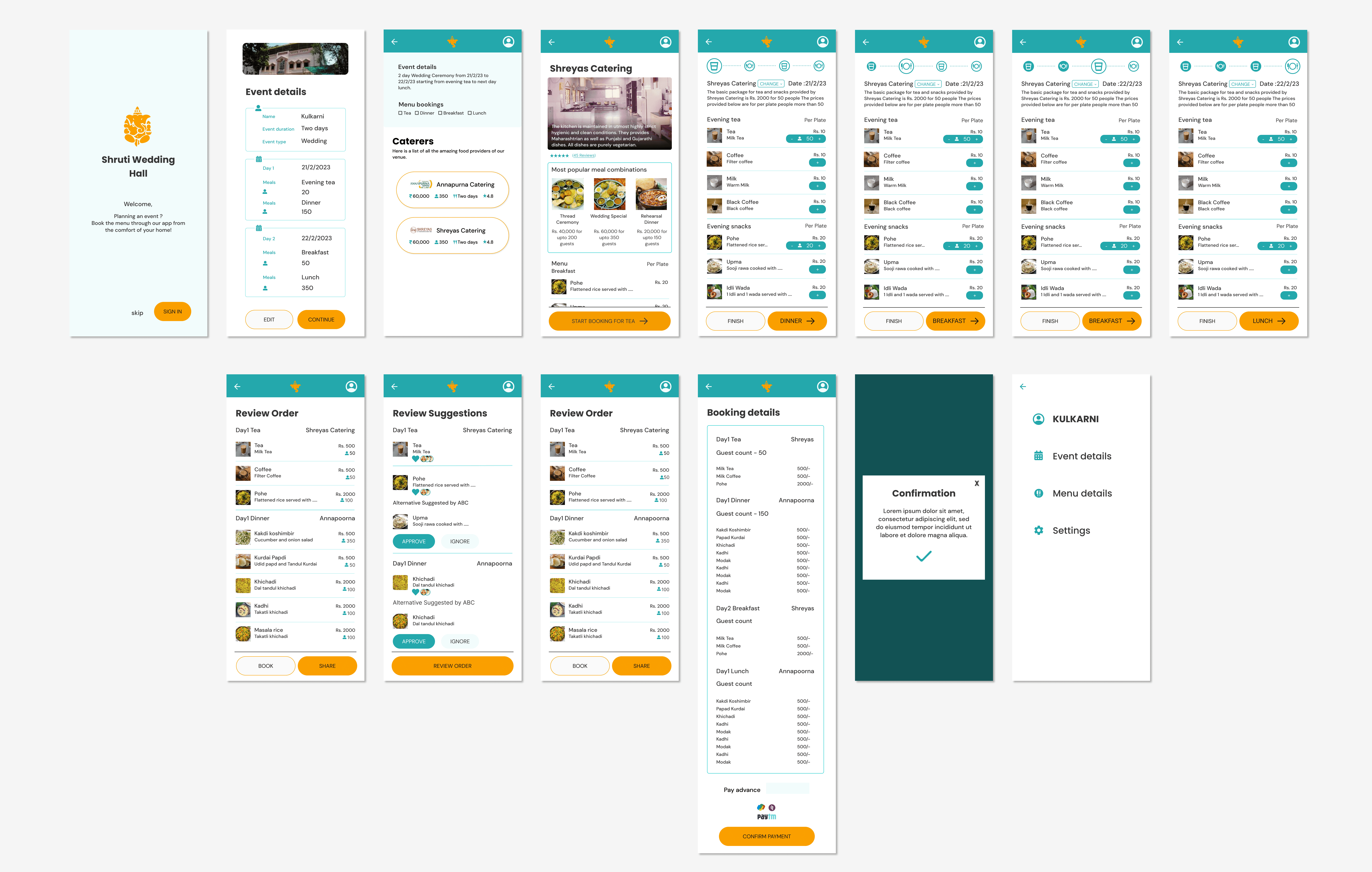
The high-fidelity prototype is built on top of the low-fidelity prototype after the first round of usability tests. It is primarily built on top of the user flow of booking the menu at the venue.
Mockup Highlights
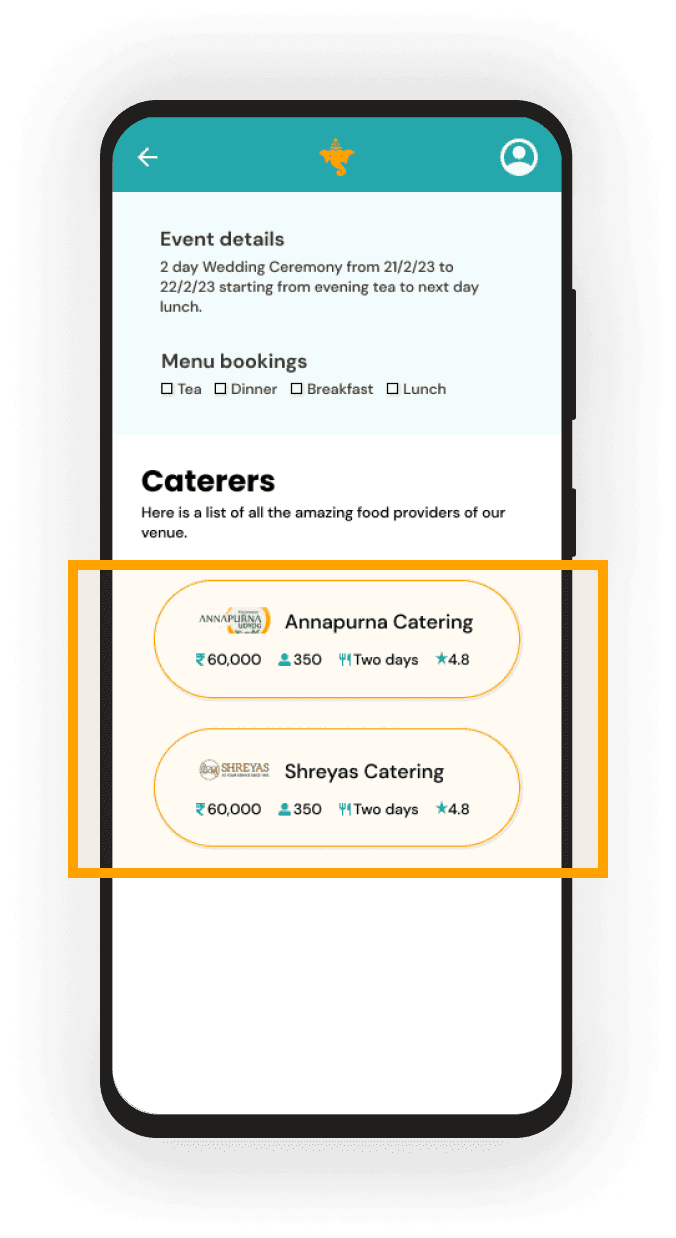 | 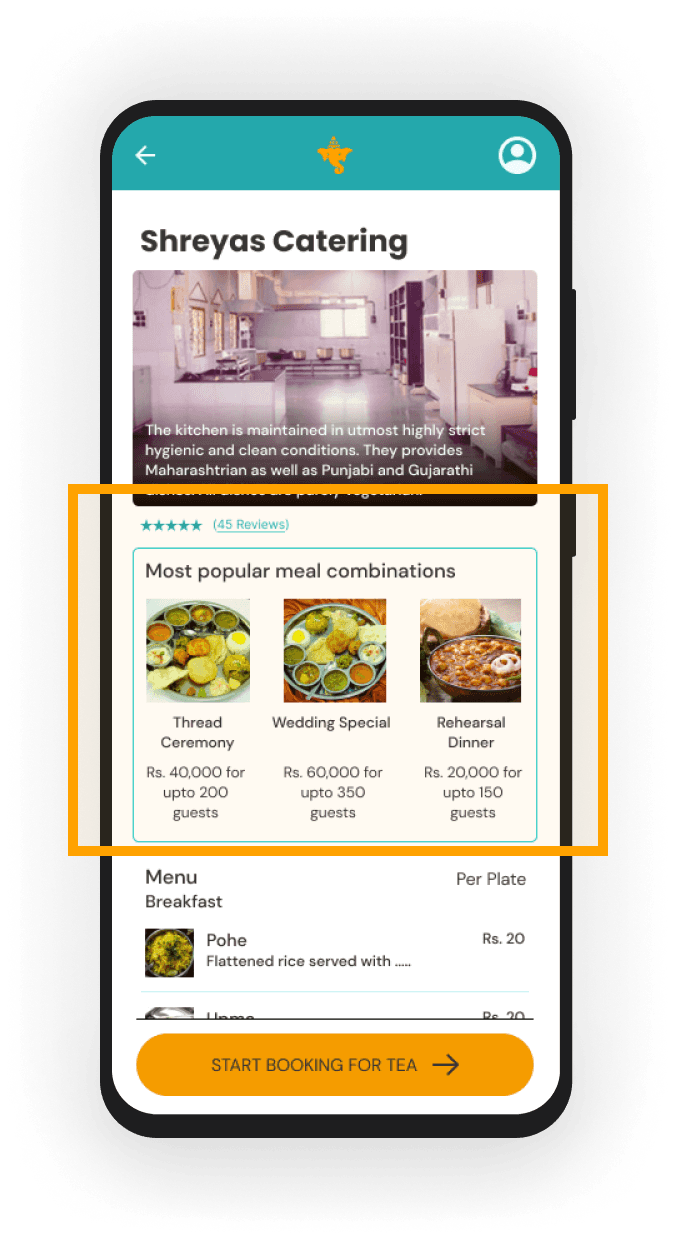 |
Explore different caterersThe users can explore different caterers at the tip of their fingers from the comfort of their homes. They can view how many guests the caterers serve and the money they typically charge. | Make a decision with the help of reviews and recommendationsThe users have access to the reviews for all the caterers and they can also see the meal recommendations, which will help them make a decision. |
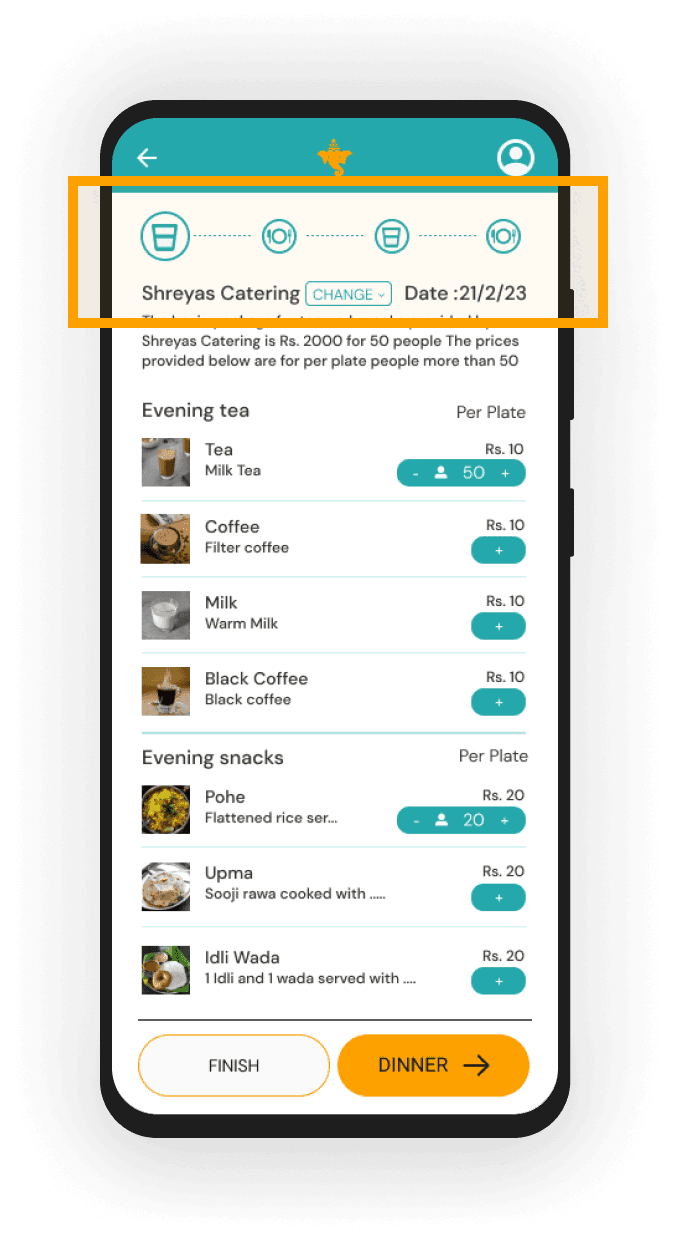 | 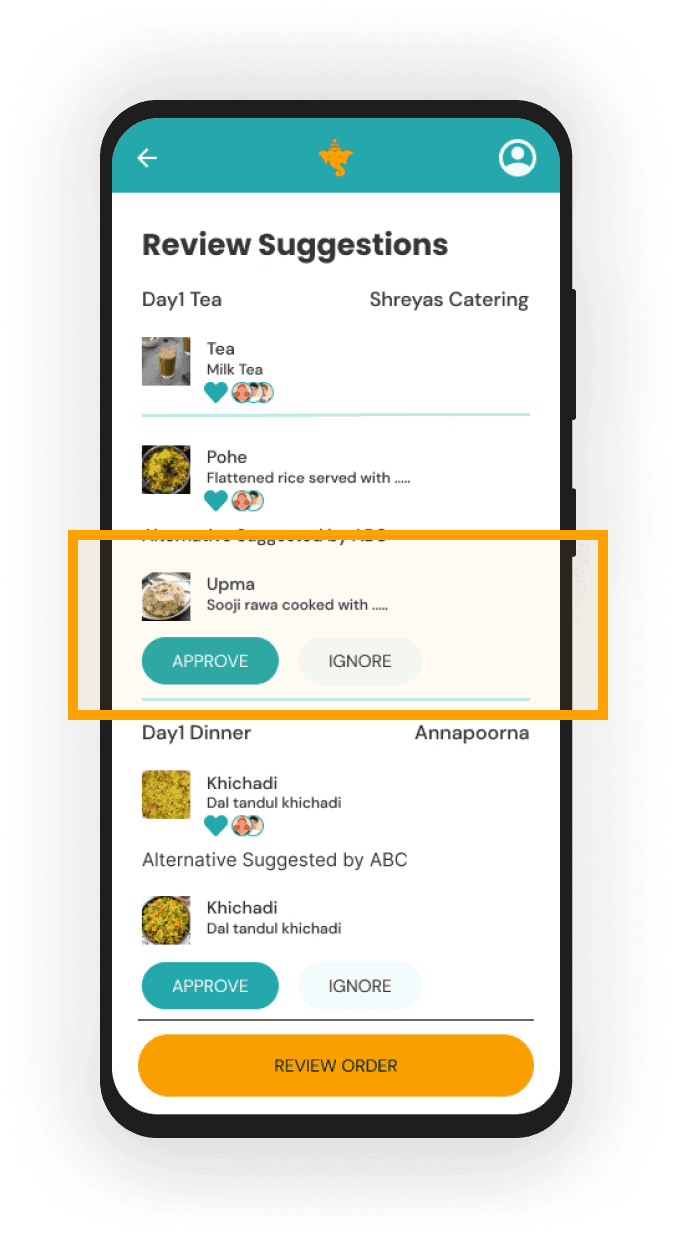 |
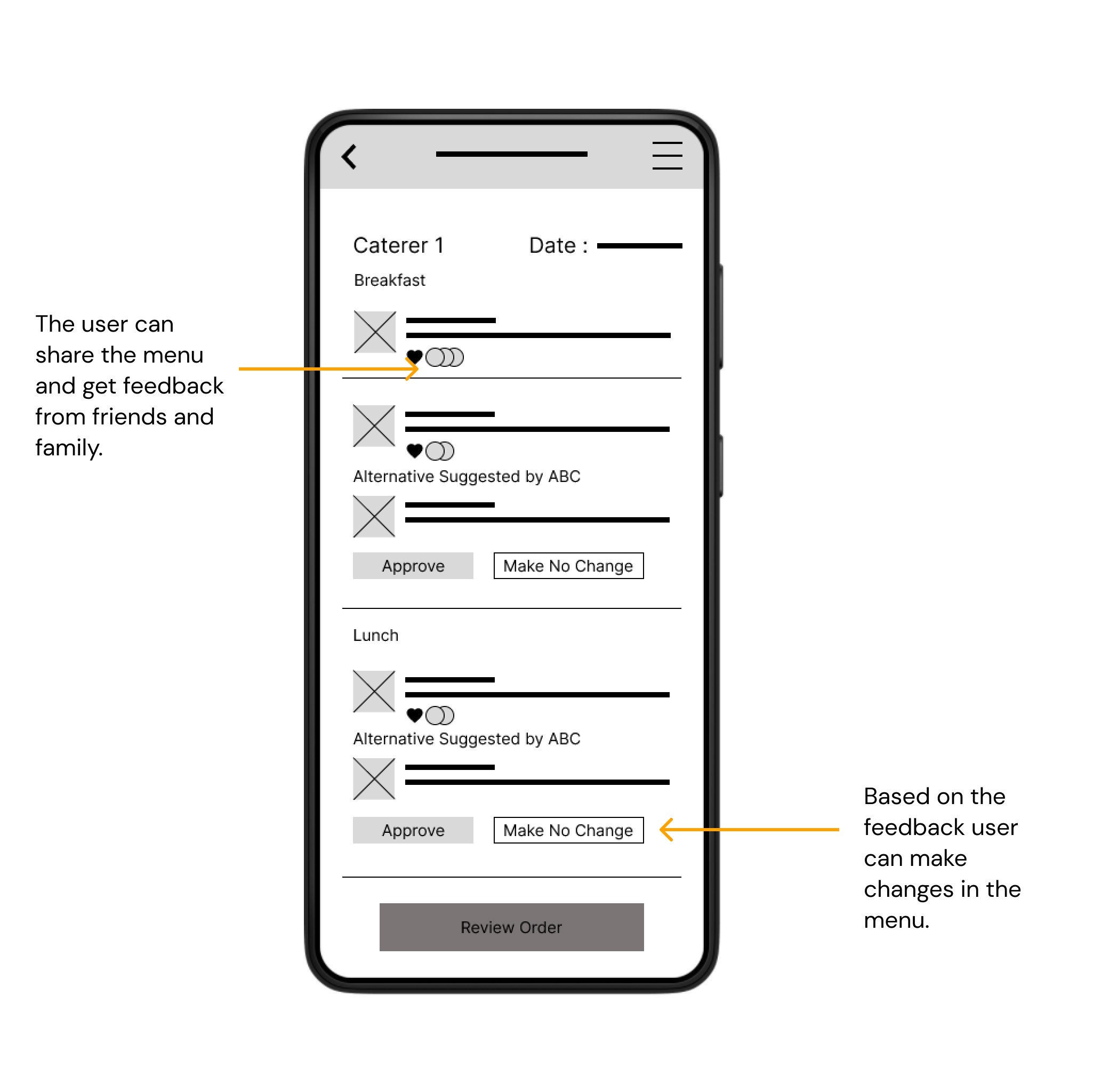
Book menus for all the mealsThe users can book the menu for all the meals from home and can see their progress as they go ahead. They can also change the caterer for the meals. | CollaborationThe users can share the menu that they have selected with their friends / family so as to collaborate with them, take their opinions and make their decisions accordingly. |
Going forward
1 | 2 |
Round two of usability test with the high fidelity prototype | Update the design with respect to the accessibility considerations |
Thank you, Let’s get in touch..
Wedding venue catering application
Product Designer
Design a collaborative platform for clients to book the menu for an event to save time and energy
UI/UX,Brand
This is a personal project completed during the Google UX Design certification course by Coursera.
The Problem
Using a prompt provided by Sharpen, the case study is done on creating a mobile application for the catering services provided by Shruti Mangal Karyalay (A wedding venue in Pune, India)
The process of booking the menu for a wedding or any family function is very manual and decentralized. This causes loss of information or miscommunication even. It requires the customer to visit the venue in person a few times amidst the planning of the event.
The Goal
The goal of the project is to create a platform where the users can book the menu for their functions at a wedding venue that can be easily tracked by both the customer and the caterer.
This will smoothen the communication between the two parties amidst the hassle of organizing an event.
The Process
Understanding the user
Starting the design
Refining the design
Moving forward
Understanding the user
Summary
I conducted interviews and empathy maps to understand the users that I am designing for and their needs. The primary group of people that I interviewed were people who were in charge of deciding and booking the menu for their own, or someone else’s wedding or any similar family function. This group included people from varied age groups.
The users confirmed the initial assumption that the process of booking the menu for any event is not a smooth ride which takes up a lot of time and many visits to the vendor’s office or the wedding venues. Other problem faced by the users was finding the time to collaborate on the finalization of the menu as the decision is always made as a group and not done by one person alone.
Pain Points
| | |
|---|---|---|
Multiple visits to the venue | Collaboration | Iterations |
The user has to visit the venue multiple times and exactly 8 days before the event to confirm the menu. The venue takes it down in writing and it is signed by the user and the vendor. | It takes a lot of time for the user to gather the concerned family members at one place and one time to discuss the menu and finalise it. | The menu is decided one month before the event but it needs to be conveyed only 8 days prior to the event. During this time, due to multiple reasons, the menu keeps changing internally and is hard to keep a track of it. |
Persona : Shekhar Punde
Problem Statement - Shekhar Punde is a retired family man who needs a hassle free way to arrange family functions with memorable food because he spends a lot of time in visiting the venue and booking the menu for family functions.
| Goals
| Frustrations
|
|---|---|---|
Shekhar Punde Age : 55 Education : Electrical Engineer Hometown : Pune, India Family : Wife, two daughters Occupation : Retired business owner | Shekhar ran a stationary and printing shop and is now happily retired and enjoys spending time with his family. He has two grandsons and he loves to engage them in creative activities. He believes in celebrating every little thing with his family and is a big time foodie. He is often in charge of deciding the menus for all the celebrations that he plans. | |
Persona : Ananya Joshi
Problem Statement - Ananya Joshi is a busy corporate woman who needs a collaborative platform for discussing and booking menu for family/corporate events because she wastes a lot of time in meetings for discussion of menus for family/corporate events
| Goals
| Frustrations
|
|---|---|---|
Ananya Joshi Age : 28 Education : MBA Hometown : Dombivli, India Family : Husband Occupation : Project Manager | Ananya is a highly ambitious woman who recently got married. She is detail oriented and depends a lot on technology to get things done in her day to day life. With her busy schedule she manages to keep in touch with her big family and is very close to her cousins. With having a big family comes planning and attending a lot of family functions, that Ananya loves to plan. | |
User Journey Map
Goal: Hassle free organization of memorable food for all the family functions
Starting the design
Paper wireframes
Taking the time to draft iterations of each screen of the app on paper ensured that the elements that made it to digital wireframes would be well-suited to address user pain points. For the home screen, I prioritized a quick and easy ordering process to help users save time.
Stars were used to mark the elements of each sketch that would be used in the initial digital wireframes.
Digital wireframes
As the initial design phase continued, I made sure to base screen designs on feedback and findings from the user research.
Low Fidelity prototype
The low-fidelity prototype connected the primary user flow of building and ordering a pizza, so the prototype could be used in a usability study with users.
View the Shruti Mangal Karyalay app
Usability study: findings
After the low fidelity prototype was ready based on the workflow, I conducted moderated usability tests with 5 participants. These participants varied from 23 years of age to 55 years of age. They were from two different towns. I did not consider participants from different areas because the target audience of this application is from my hometown and nearby hometowns. These tests were conducted online with the following goal in mind -
Goal : Figure out if collaborative ordering in the app actually saves people time and efforts when placing group orders.
Affinity Map
Findings
1 | 2 | 3 |
|---|---|---|
Users want to book different caterers for different meals | Users want clarity on how much each meal will cost them per plate and altogether | Users want to add more days to the event and book meals with respect to them. |
Refining the design
Mockups
After the usability test, I revised the mockups according to the themes that came up while the activity of affinity mapping. The themes and the revisions are as described below in details.
People want to book different caterers for different meals | Before | After |
|---|---|---|
Supporting evidence from the usability study.
“I want to know how I can book separate meals from different caterers. I also want to know which dates I am booking the menu for.” -Mandar Kulkarni, event planner from Mumbai | | |
Add more than two days to the event | Before | After |
|---|---|---|
Supporting evidence from the usability study.
"Is there a way that I can add another day to the event?” Sarvesh Kale, Pune (P0) | | |
Enter the number of guests and see the cost accordingly | Before | After |
|---|---|---|
It was observed that 4 out of 5 participants found it difficult to see how much the meal they selected would cost for all the guests.
"I wish I could see the cost of all the dishes individually and also after I customize the whole meal. I would like to know how much it would cost me per plate.” -Rohini Kale, Pune(P0) | | |
Low Fidelity Prototype
High Fidelity Prototype
The high-fidelity prototype is built on top of the low-fidelity prototype after the first round of usability tests. It is primarily built on top of the user flow of booking the menu at the venue.
Mockup Highlights
| |
Explore different caterersThe users can explore different caterers at the tip of their fingers from the comfort of their homes. They can view how many guests the caterers serve and the money they typically charge. | Make a decision with the help of reviews and recommendationsThe users have access to the reviews for all the caterers and they can also see the meal recommendations, which will help them make a decision. |
| |
Book menus for all the mealsThe users can book the menu for all the meals from home and can see their progress as they go ahead. They can also change the caterer for the meals. | CollaborationThe users can share the menu that they have selected with their friends / family so as to collaborate with them, take their opinions and make their decisions accordingly. |
Going forward
1 | 2 |
Round two of usability test with the high fidelity prototype | Update the design with respect to the accessibility considerations |
Thank you, Let’s get in touch..
Wedding venue catering application
Product Designer
Design a collaborative platform for clients to book the menu for an event to save time and energy
UI/UX,Brand
This is a personal project completed during the Google UX Design certification course by Coursera.
The Problem
Using a prompt provided by Sharpen, the case study is done on creating a mobile application for the catering services provided by Shruti Mangal Karyalay (A wedding venue in Pune, India)
The process of booking the menu for a wedding or any family function is very manual and decentralized. This causes loss of information or miscommunication even. It requires the customer to visit the venue in person a few times amidst the planning of the event.
The Goal
The goal of the project is to create a platform where the users can book the menu for their functions at a wedding venue that can be easily tracked by both the customer and the caterer.
This will smoothen the communication between the two parties amidst the hassle of organizing an event.
The Process
Understanding the user
Starting the design
Refining the design
Moving forward
Understanding the user
Summary
I conducted interviews and empathy maps to understand the users that I am designing for and their needs. The primary group of people that I interviewed were people who were in charge of deciding and booking the menu for their own, or someone else’s wedding or any similar family function. This group included people from varied age groups.
The users confirmed the initial assumption that the process of booking the menu for any event is not a smooth ride which takes up a lot of time and many visits to the vendor’s office or the wedding venues. Other problem faced by the users was finding the time to collaborate on the finalization of the menu as the decision is always made as a group and not done by one person alone.
Pain Points
| | |
|---|---|---|
Multiple visits to the venue | Collaboration | Iterations |
The user has to visit the venue multiple times and exactly 8 days before the event to confirm the menu. The venue takes it down in writing and it is signed by the user and the vendor. | It takes a lot of time for the user to gather the concerned family members at one place and one time to discuss the menu and finalise it. | The menu is decided one month before the event but it needs to be conveyed only 8 days prior to the event. During this time, due to multiple reasons, the menu keeps changing internally and is hard to keep a track of it. |
Persona : Shekhar Punde
Problem Statement - Shekhar Punde is a retired family man who needs a hassle free way to arrange family functions with memorable food because he spends a lot of time in visiting the venue and booking the menu for family functions.
| Goals
| Frustrations
|
|---|---|---|
Shekhar Punde Age : 55 Education : Electrical Engineer Hometown : Pune, India Family : Wife, two daughters Occupation : Retired business owner | Shekhar ran a stationary and printing shop and is now happily retired and enjoys spending time with his family. He has two grandsons and he loves to engage them in creative activities. He believes in celebrating every little thing with his family and is a big time foodie. He is often in charge of deciding the menus for all the celebrations that he plans. | |
Persona : Ananya Joshi
Problem Statement - Ananya Joshi is a busy corporate woman who needs a collaborative platform for discussing and booking menu for family/corporate events because she wastes a lot of time in meetings for discussion of menus for family/corporate events
| Goals
| Frustrations
|
|---|---|---|
Ananya Joshi Age : 28 Education : MBA Hometown : Dombivli, India Family : Husband Occupation : Project Manager | Ananya is a highly ambitious woman who recently got married. She is detail oriented and depends a lot on technology to get things done in her day to day life. With her busy schedule she manages to keep in touch with her big family and is very close to her cousins. With having a big family comes planning and attending a lot of family functions, that Ananya loves to plan. | |
User Journey Map
Goal: Hassle free organization of memorable food for all the family functions
Starting the design
Paper wireframes
Taking the time to draft iterations of each screen of the app on paper ensured that the elements that made it to digital wireframes would be well-suited to address user pain points. For the home screen, I prioritized a quick and easy ordering process to help users save time.
Stars were used to mark the elements of each sketch that would be used in the initial digital wireframes.
Digital wireframes
As the initial design phase continued, I made sure to base screen designs on feedback and findings from the user research.
Low Fidelity prototype
The low-fidelity prototype connected the primary user flow of building and ordering a pizza, so the prototype could be used in a usability study with users.
View the Shruti Mangal Karyalay app
Usability study: findings
After the low fidelity prototype was ready based on the workflow, I conducted moderated usability tests with 5 participants. These participants varied from 23 years of age to 55 years of age. They were from two different towns. I did not consider participants from different areas because the target audience of this application is from my hometown and nearby hometowns. These tests were conducted online with the following goal in mind -
Goal : Figure out if collaborative ordering in the app actually saves people time and efforts when placing group orders.
Affinity Map
Findings
1 | 2 | 3 |
|---|---|---|
Users want to book different caterers for different meals | Users want clarity on how much each meal will cost them per plate and altogether | Users want to add more days to the event and book meals with respect to them. |
Refining the design
Mockups
After the usability test, I revised the mockups according to the themes that came up while the activity of affinity mapping. The themes and the revisions are as described below in details.
People want to book different caterers for different meals | Before | After |
|---|---|---|
Supporting evidence from the usability study.
“I want to know how I can book separate meals from different caterers. I also want to know which dates I am booking the menu for.” -Mandar Kulkarni, event planner from Mumbai | | |
Add more than two days to the event | Before | After |
|---|---|---|
Supporting evidence from the usability study.
"Is there a way that I can add another day to the event?” Sarvesh Kale, Pune (P0) | | |
Enter the number of guests and see the cost accordingly | Before | After |
|---|---|---|
It was observed that 4 out of 5 participants found it difficult to see how much the meal they selected would cost for all the guests.
"I wish I could see the cost of all the dishes individually and also after I customize the whole meal. I would like to know how much it would cost me per plate.” -Rohini Kale, Pune(P0) | | |
Low Fidelity Prototype
High Fidelity Prototype
The high-fidelity prototype is built on top of the low-fidelity prototype after the first round of usability tests. It is primarily built on top of the user flow of booking the menu at the venue.
Mockup Highlights
| |
Explore different caterersThe users can explore different caterers at the tip of their fingers from the comfort of their homes. They can view how many guests the caterers serve and the money they typically charge. | Make a decision with the help of reviews and recommendationsThe users have access to the reviews for all the caterers and they can also see the meal recommendations, which will help them make a decision. |
| |
Book menus for all the mealsThe users can book the menu for all the meals from home and can see their progress as they go ahead. They can also change the caterer for the meals. | CollaborationThe users can share the menu that they have selected with their friends / family so as to collaborate with them, take their opinions and make their decisions accordingly. |
Going forward
1 | 2 |
Round two of usability test with the high fidelity prototype | Update the design with respect to the accessibility considerations |
Thank you, Let’s get in touch..